bin2bmp Tool
Tool Overview
bin2bmp is a small debugging utility that converts raw framebuffer binary data back into BMP images. Common use cases include:
When the screen display is abnormal, directly inspect what LVGL actually wrote into the framebuffer — to decide whether the problem lies in LVGL rendering or the LCD driver / panel itself
Capture the current screen content as an image on boards that do not have a dedicated screenshot interface
Verify dual-buffer switching, partial refresh, and other display logic
The tool lives under tools/bin2bmp/ in the SDK and consists of three files:
File |
Purpose |
|---|---|
|
Core library for BMP generation and pixel format conversion |
|
Offline mode: convert an existing |
|
Online mode: dump the framebuffer directly from the board via J-Link, then convert to BMP |
How It Works
The whole flow is a two-step pipeline: “memory → bin file → BMP image”:
┌────────────┐   J-Link/SWD   ┌────────────┐   bin2bmp    ┌─────────┐
│ Board RAM   │ ────────────▶ │  xxx.bin   │ ──────────▶ │ xxx.bmp │
│ framebuffer │   (savebin)   │ (raw data) │  (decode)    │ (image) │
└────────────┘               └────────────┘              └─────────┘
jlinkbin2bmp.pydoes both steps in one shot: it first invokesJLink.exe’ssavebincommand to dump a memory range into a.binfile, then callsbmp.pyto decode that.bininto a.bmpand opens it automatically.bin2bmp.pyonly does the second step — useful when you already have a.binfile on hand (a previous dump, or one shared by a colleague).
Supported Pixel Formats
The tool supports the pixel formats commonly found in framebuffers. The format argument must match the project’s actual configuration, otherwise the decoded image will look like scrambled color stripes.
Format |
Bit depth |
Bytes/pixel |
Description |
|---|---|---|---|
|
8 |
1 |
8-bit alpha, monochrome (default red) + transparency |
|
4 |
0.5 |
4-bit alpha, 2 pixels per byte |
|
2 |
0.25 |
2-bit alpha, 4 pixels per byte |
|
8 |
1 |
R3G3B2 |
|
16 |
2 |
R5G6B5 |
|
16 |
2 |
B5G6R5 |
|
24 |
3 |
A8 + R5G6B5 |
|
24 |
3 |
R8G8B8 |
|
32 |
4 |
A8R8G8B8 |
|
32 |
4 |
R8G8B8A8 |
|
16 |
2 |
YUV 4:2:2 packed (Y0 U Y1 V) |
|
16 |
2 |
YUV 4:2:2 packed (U Y0 V Y1) |
Prerequisites
Python 3: run
python xxx.pydirectly — no third-party packages required (uses only the standard library).J-Link: when using
jlinkbin2bmp.py, install SEGGER J-Link and make sureJLink.exeis on your PATH.The board is connected to J-Link via SWD and the firmware is running.
Below we walk through a complete example using the example/multimedia/lvgl/watch sample from the SDK (board sf32lb58-lcd_a128r32n1, screen 390×450, RGB888).
Method 1 (Recommended): jlinkbin2bmp.py — Online Dump
This is the most common workflow. One command does everything and opens the resulting BMP automatically.
Step 1: Find the framebuffer address in main.map
After a successful build, main.map is generated in the build directory. It contains the link addresses of all global and static variables. The framebuffer variables follow a predictable naming pattern:
Variable |
Location |
Purpose |
|---|---|---|
|
L1 SRAM (0x2000xxxx) |
LVGL partial refresh drawing buffers. Height = |
|
L2 PSRAM (0x62xxxxxx) |
Full-screen framebuffers, used in RAMLESS LCD mode or when |
If you want to see what is actually on the screen, dump
buf2_1/buf2_2.buf1_xis just LVGL’s staging buffer — it only holds a few rows of the current refresh region.
Search for the keyword frambuf in the watch sample’s main.map:
 .bss.l1_non_ret_bss_frambuf
                0x2000ef50    0x3ed78 .../middleware/lvgl/lv_drivers/lv_lcd.o
 ...
 .bss.l2_non_ret_bss_anim_frambuf
                0x62000000   0x101148 .../middleware/lvgl/app_mem.o
 *fill*         0x62101148       0x38
 .bss.l2_non_ret_bss_frambuf
                0x62101180   0x101164 .../middleware/lvgl/lv_drivers/lv_lcd.o
Reading this:
buf2_1 starts at
0x62101180— that is the start of thel2_non_ret_bss_frambufsection.Section size 0x101164 = 1,053,028 bytes ≈ two 390×450×3 full-screen buffers plus alignment padding.
buf2_2 immediately follows buf2_1 (64-byte aligned). Offset =
ALIGN(390*450*3, 64)= 0x808C0, therefore buf2_2 =0x62101180 + 0x808C0=0x62181A40.
Note
Different projects, screen resolutions, and color depths produce different addresses. Addresses can also change between builds — always use the latest main.map from your current build directory.
Step 2: Confirm color format and resolution
Open the .config file in the build directory and search for:
CONFIG_LCD_HOR_RES_MAX=390          # horizontal resolution
CONFIG_LCD_VER_RES_MAX=450          # vertical resolution
CONFIG_LV_COLOR_DEPTH_24=y          # 24-bit = RGB888, 3 bytes per pixel
# CONFIG_LV_COLOR_DEPTH_16 is not set
LV_COLOR_DEPTH |
Corresponding jlinkbin2bmp format argument |
|---|---|
16 |
|
24 |
|
32 |
|
For this example: resolution 390×450, color format rgb888.
Step 3: Run the dump command
From the SDK root:
cd tools/bin2bmp
python jlinkbin2bmp.py "-if SWD -speed 12000" rgb888 390 450 62101180
Argument breakdown:
# |
Meaning |
|---|---|
1 |
Connection parameters passed to J-Link. For direct USB use |
2 |
Pixel format (lowercase). |
3 / 4 |
Width / height in pixels. |
5 |
Framebuffer start address in hex (the |
You will see J-Link connection logs. The line Reading 526500 bytes from addr 0x62101180 into file...O.K. confirms a successful dump, and the script then opens the generated BMP with your system’s default image viewer.
Step 4: Inspect the result
The two images below are actual dumps from the example/multimedia/lvgl/watch sample running on the board — they show the watch main-menu UI:
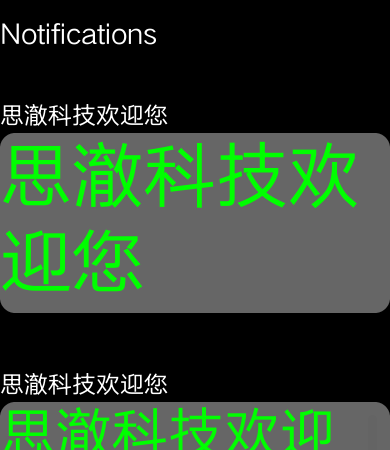
Fig. 1 buf2_1 (address 0x62101180): watch main menu
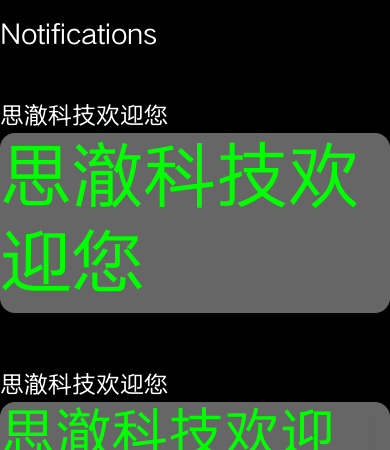
Fig. 2 buf2_2 (address 0x62181A40): identical to buf2_1 (static frame, both buffers are in sync)
Note
When the frame is static, both buffers have the same content. During animations or scrolling they alternate between an “old” and a “new” frame, which is exactly how you can observe the dual-buffer swap timing with this tool.
Method 2: bin2bmp.py — Offline Conversion
Use bin2bmp.py when you already have a .bin file on hand (saved previously, or received from a colleague):
python bin2bmp.py hcpu_ram.bin rgb565 454 454 2000
Argument breakdown:
# |
Meaning |
|---|---|
1 |
Path to the bin file. |
2 |
Pixel format. |
3 / 4 |
Width / height in pixels. |
5 (optional) |
Offset in hex (e.g. |
The output BMP is named <bin_filename>_offset0x<offset>_<width>x<height>_<format>.bmp and opens with the system’s default image viewer.
FAQ
The decoded image is full of color stripes
Wrong pixel format. For example, RGB565 misinterpreted as RGB888 throws off every pixel boundary. Go back to
.configand double-checkLV_COLOR_DEPTH.Wrong resolution. Either dimension being incorrect produces diagonal stripes. Confirm
LCD_HOR_RES_MAX/LCD_VER_RES_MAXin.config.
The whole image is shifted left/right or up/down
The address does not point at the true buffer start. Re-read
main.map. If you are dumpingbuf2_2, make sure you accounted for the 64-byte alignment padding that follows buf2_1.
The decoded image is all black / all white / all zeros
That particular buffer is not currently in use. For example, a single-buffer configuration (
LV_FB_ONE_NOT_SCREEN_SIZE) meansbuf1_2does not exist, or one of the dual buffers may just not be the one actively being refreshed.The screen genuinely shows a pure black/white frame (e.g. during boot logo or blanking).
The image is upside down
BMP files store pixels bottom-up, and the tool already handles the flip. If it still looks inverted, the height argument is most likely wrong — check whether you are reading a partial buffer (LV_FB_LINE_NUM) or a full-screen buffer.
J-Link connection fails
Check the SWD wiring and that the board is powered.
Verify no other program (Ozone, J-Flash, Keil debugger, etc.) is holding the J-Link.
For remote access, confirm UsartServer is running and listening on the expected port.
Tips and Tricks
Capture intermediate animation frames. Run the dump while an animation is playing —
buf2_1andbuf2_2will differ, showing the “currently displayed” and “currently being drawn” frames respectively.Inspect partial refresh regions. Dump
buf1_1(height =LV_FB_LINE_NUMrows) to see the slice LVGL is currently composing.Batch dumps for comparison.
jlinkbin2bmp.pyalways names the file with<address>_<width>x<height>_<format>.bmp, so archives are self-documenting.