
SF32LB52-DevKit-Core-3p3 Development Board User Guide
Development Board Version Information
*-N1-V1.0.0: equipped with the SF32LB52BU36 chip (internally stacked with 1MB NOR Flash)
*-N4-V1.0.0: equipped with the SF32LB52BU56 chip (internally stacked with 4MB NOR Flash)
*-R4N16-V1.0.0: equipped with SF32LB52EUB6 (internally stacked with 8MB PSRAM) + 16MB NOR Flash
*-R8N16-V1.0.0: equipped with SF32LB52GUC6 (internally stacked with 8MB PSRAM) + 16MB NOR Flash
*-R16N16-V1.0.0: equipped with SF32LB52JUD6 (internally stacked with 16MB PSRAM) + 16MB NOR Flash, current version
1. Development Board Overview
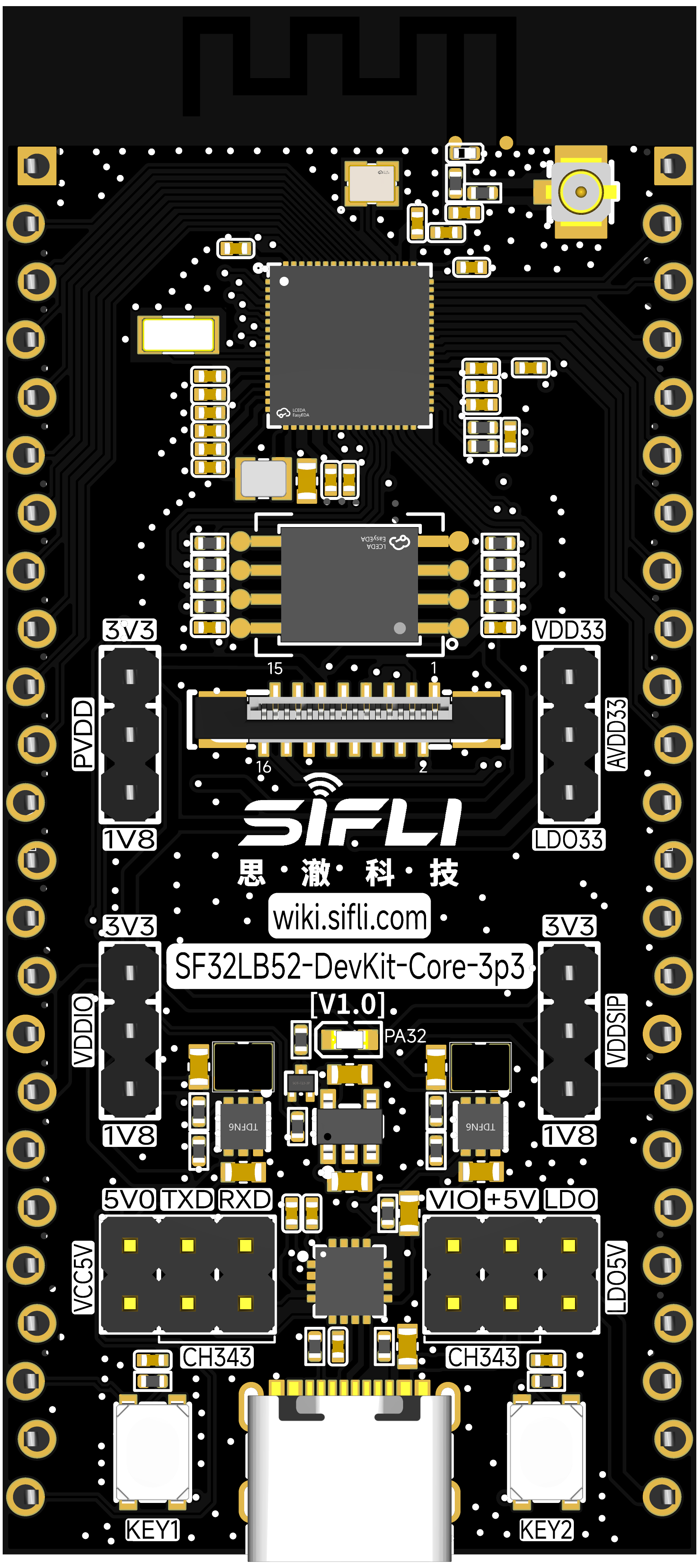
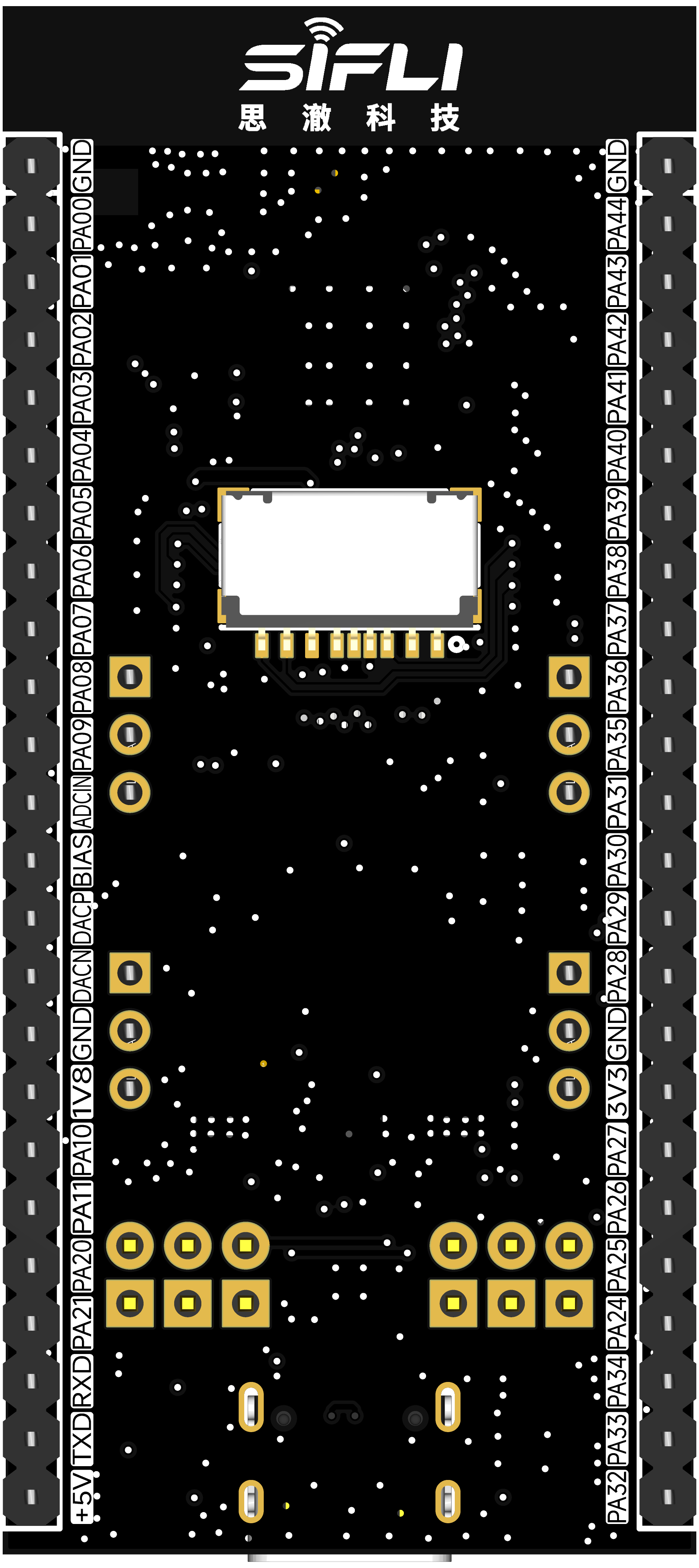
The SF32LB52-DevKit-Core-3p3 is a development board based on SiFli Technology’s SF32LB52BU56/SF32LB52JUD6 chips. It measures only 30.88 mm x 68 mm. The pin headers use a castellated through-hole edge design, so headers can be inserted into the board without soldering. The board supports GPIO, UART, I2C, SPI, LCD, I2S, GPADC, PWM, and analog audio input/output.
2. Feature List
This development board provides the following features:
Board variants:
-N1: onboard SF32LB52BU36 chip with the following configuration:
Stacked memory:
1MB NOR Flash, 96 MHz interface frequency
-N4: onboard SF32LB52BU56 chip with the following configuration:
Stacked memory:
4MB NOR Flash, 96 MHz interface frequency
-R4N16: onboard SF32LB52EUB6 chip with the following configuration:
Stacked memory:
4MB OPI-PSRAM, 144 MHz interface frequency
Onboard 16MB QSPI-NOR Flash, 72 MHz interface frequency, STR mode
-R8N16: onboard SF32LB52GUC6 chip with the following configuration:
Stacked memory:
8MB OPI-PSRAM, 144 MHz interface frequency
Onboard 16MB QSPI-NOR Flash, 72 MHz interface frequency, STR mode
-R16N16: onboard SF32LB52JUD6 chip with the following configuration:
Stacked memory:
16MB OPI-PSRAM, 144 MHz interface frequency
Onboard 16MB QSPI-NOR Flash, 72 MHz interface frequency, STR mode
Crystals
48 MHz crystal
32.768 KHz crystal
Antenna
Onboard PCBA antenna
Onboard I-PEX antenna connector
GPIO
Supports 37 GPIOs
UART-I2C-GPTIM
3x UART
4x I2C
2x GPTIM
All GPIOs can be configured as UART, I2C, or GPTIM
SPI
2x SPI
GPADC
6x GPADC
Display
FPC16P, 0.5 mm pitch connector for display expansion
SPI/DSPI/Quad SPI, supports DDR-mode QSPI display interface
Supports touch panels with an I2C interface
Supports the 1.85inch AMOLED Module display through a 16p flat cable
Audio
Supports audio ADC input for analog microphones or MEMS microphones
Supports PDM digital microphone input
Analog audio output requires an external Class-AB/D audio PA to drive a speaker
USB
Type-C UART interface with onboard CH340N serial chip for firmware download, software debug, and power supply
USB interface, supports USB 2.0 FS, routed out through pin headers
Buttons
1x function button
1x power button, supports long-press reset for 10 seconds
LEDs
1x LED, GPIO controlled
Power supply
Powered through the USB Type-C interface
Onboard LDO converts VBUS 5 V to 3.3 V
Onboard power switch can be enabled through the CH340N RTS# pin to reset the MCU
Supports jumper configuration for 1.8 V or 3.3 V MCU power supply
Supports measuring single-rail power current by connecting an ammeter in series
Supports single-MCU power test, minimum-system power test, and whole-board power test
3. Pin Definition
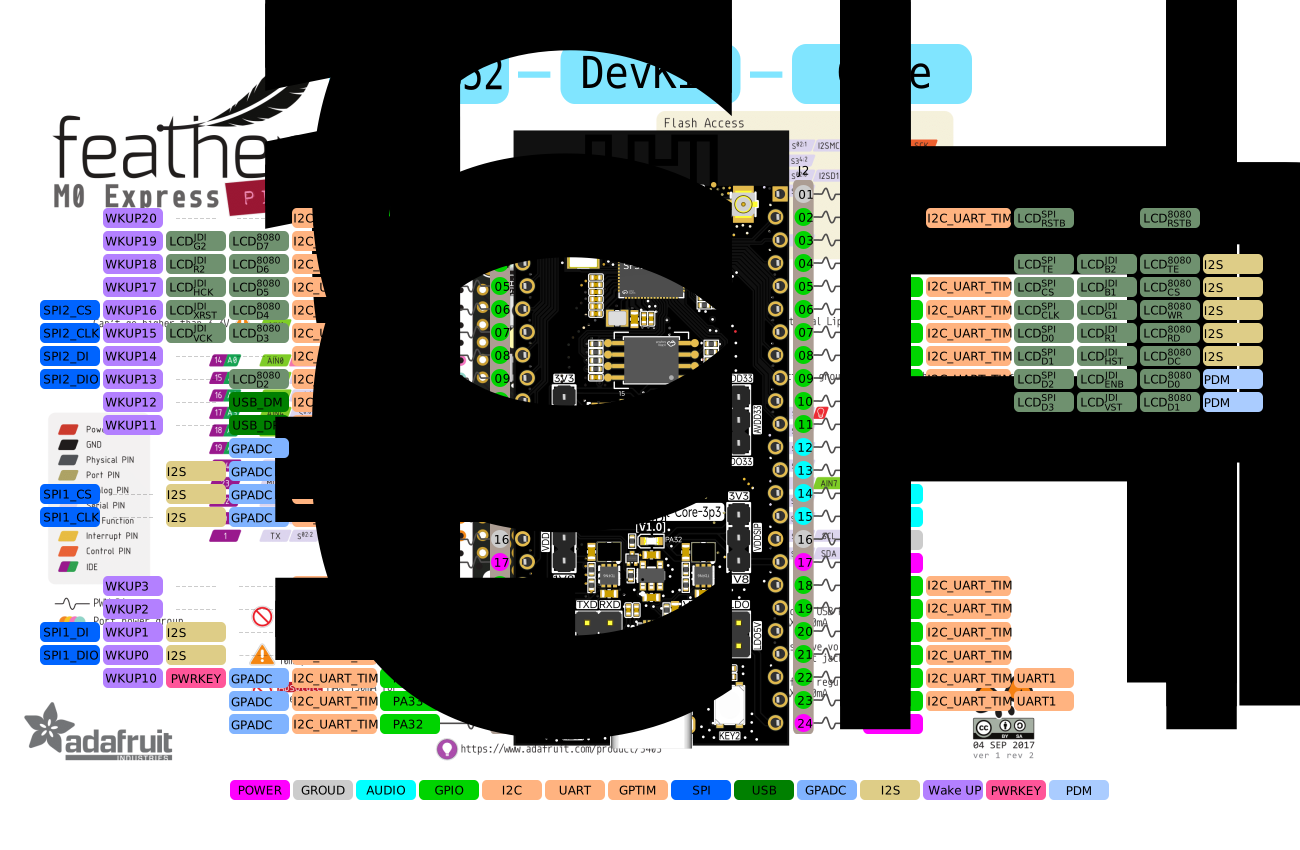
Detailed Pin Description
The following table provides detailed descriptions of the pins on the SF32LB52-DevKit-Core-3p3 development board.
Pin |
Pin Name |
Reset Default and Multiplexed Functions |
Pull |
|---|---|---|---|
1 |
GND |
Ground |
|
2 |
PA_44 |
PA44, UART, I2C, GPTIM, and WKUP20 |
PD |
3 |
PA_43 |
PA43, UART, I2C, GPTIM, and WKUP19 |
PD |
4 |
PA_42 |
PA42, UART, I2C, GPTIM, and WKUP18 |
PU |
5 |
PA_41 |
PA41, UART, I2C, GPTIM, and WKUP17 |
PU |
6 |
PA_40 |
PA40, UART, I2C, GPTIM, SPI2_CS, and WKUP16 |
PU |
7 |
PA_39 |
PA39, UART, I2C, GPTIM, SPI2_CLK, and WKUP15 |
PU |
8 |
PA_38 |
PA38, UART, I2C, GPTIM, SPI2_DI, and WKUP14 |
PD |
9 |
PA_37 |
PA37, UART, I2C, GPTIM, SPI2_DIO, and WKUP13 |
PD |
10 |
PA_36 |
PA36, UART, I2C, GPTIM, USB_DM, and WKUP12 |
PD |
11 |
PA_35 |
PA35, UART, I2C, GPTIM, USB_DP, and WKUP11 |
PD |
12 |
PA_31 |
PA31, UART, I2C, GPTIM, and GPADC3 |
PD |
13 |
PA_30 |
PA30, UART, I2C, GPTIM, I2S1_LRCK, and GPADC2 |
PD |
14 |
PA_29 |
PA29, UART, I2C, GPTIM, SPI1_CS, I2S1_BCK, and GPADC1 |
PD |
15 |
PA_28 |
PA28, UART, I2C, GPTIM, SPI1_CLK, I2S1_SDI, and GPADC0 |
PD |
16 |
GND |
Ground |
|
17 |
3.3V |
3.3 V power. When USB Type-C is not connected, it can be used as a 3.3 V input; when USB Type-C is connected, it can be used as a 3.3 V output |
|
18 |
PA_27 |
PA27, UART, I2C, GPTIM, and WKUP3 |
PU |
19 |
PA_26 |
PA26, UART, I2C, GPTIM, and WKUP2 |
PU |
20 |
PA_25 |
PA25, UART, I2C, GPTIM, SPI1_DI, I2S1_SDO, and WKUP1 |
PD |
21 |
PA_24 |
PA24, UART, I2C, GPTIM, SPI1_DIO, I2S1_MCLK, and WKUP0 |
PD |
22 |
PA_34 |
PA34, UART, I2C, GPTIM, GPADC6, and WKUP10 |
PD |
23 |
PA_33 |
PA33, UART, I2C, GPTIM, and GPADC5 |
PD |
24 |
PA_32 |
PA32, UART, I2C, GPTIM, and GPADC4 |
PD |
Pin |
Pin Name |
Reset Default and Multiplexed Functions |
Pull |
|---|---|---|---|
1 |
GND |
Ground |
|
2 |
PA_00 |
PA00, UART, I2C, GPTIM, and LCD_RST |
PD |
3 |
PA_01 |
PA01, UART, I2C, GPTIM, and BL_PWM |
PD |
4 |
PA_02 |
PA02, UART, I2C, GPTIM, LCD_TE, and I2S1_MCLK |
PD |
5 |
PA_03 |
PA03, UART, I2C, GPTIM, LCD_CS, and I2S1_SDO |
PU |
6 |
PA_04 |
PA04, UART, I2C, GPTIM, LCD_CLK, and I2S1_SDI |
PD |
7 |
PA_05 |
PA05, UART, I2C, GPTIM, LCD_D0, and I2S1_BCK |
PD |
8 |
PA_06 |
PA06, UART, I2C, GPTIM, LCD_D1, and I2S1_LRCK |
PD |
9 |
PA_07 |
PA07, UART, I2C, GPTIM, LCD_D2, and PDM1_CLK |
PD |
10 |
PA_08 |
PA08, UART, I2C, GPTIM, LCD_D3, and PDM1_DAT |
PD |
11 |
PA_09 |
PA09, UART, I2C, GPTIM, and CTP_INT |
PD |
12 |
MIC_ADC |
MIC input signal |
|
13 |
MIC_BIAS |
MIC bias voltage |
|
14 |
DACP |
Analog audio output signal |
|
15 |
DACN |
Analog audio output signal |
|
16 |
GND |
Ground |
|
17 |
1.8V |
1.8 V power. When USB Type-C is not connected, it can be used as a 1.8 V input; when USB Type-C is connected, it can be used as a 1.8 V output |
|
18 |
PA_10 |
PA10, UART, I2C, GPTIM, and CTP_RST |
PD |
19 |
PA_11 |
PA11, UART, I2C, GPTIM, and CTP_SDA |
PU |
20 |
PA_20 |
PA20, UART, I2C, GPTIM, and CTP_SCL |
PD |
21 |
PA_21 |
PA21, UART, I2C, and GPTIM |
PD |
22 |
PA_18 |
UART0_RXD, debug and download port, PA18, SWDIO, I2C, and GPTIM |
PU |
23 |
PA_19 |
UART0_TXD, debug and download port, PA19, SWCLK, I2C, and GPTIM |
None |
24 |
5V |
5 V power. When USB Type-C is not connected, it can be used as a 5 V input; when USB Type-C is connected, it can be used as a 5 V output |
16p QSPI FPC Interface Pin Sequence Definition
Pin |
Pin Name |
Reset Default and Multiplexed Functions |
Pull |
|---|---|---|---|
1 |
GND |
Ground |
|
2 |
PA_00 |
PA00, UART, I2C, GPTIM, and LCD_RST |
PD |
3 |
PA_01 |
PA01, UART, I2C, GPTIM, and BL_PWM |
PD |
4 |
PA_02 |
PA02, UART, I2C, GPTIM, LCD_TE, and I2S1_MCLK |
PD |
5 |
PA_03 |
PA03, UART, I2C, GPTIM, LCD_CS, and I2S1_SDO |
PU |
6 |
PA_04 |
PA04, UART, I2C, GPTIM, LCD_CLK, and I2S1_SDI |
PD |
7 |
PA_05 |
PA05, UART, I2C, GPTIM, LCD_D0, and I2S1_BCK |
PD |
8 |
PA_06 |
PA06, UART, I2C, GPTIM, LCD_D1, and I2S1_LRCK |
PD |
9 |
PA_07 |
PA07, UART, I2C, GPTIM, LCD_D2, and PDM1_CLK |
PD |
10 |
PA_08 |
PA08, UART, I2C, GPTIM, LCD_D3, and PDM1_DAT |
PD |
11 |
3.3V |
3.3 V power output |
|
12 |
GND |
Ground |
|
13 |
PA_09 |
PA09, UART, I2C, GPTIM, and CTP_INT |
PD |
14 |
PA_11 |
PA11, UART, I2C, GPTIM, and CTP_SDA |
PU |
15 |
PA_20 |
PA20, UART, I2C, GPTIM, and CTP_SCL |
PD |
16 |
PA_10 |
PA10, UART, I2C, GPTIM, and CTP_RST |
PD |
4. Function Introduction
Power Supply Description
The development board supports the following three power supply methods:
USB Type-C power supply (default)
5 V and GND pin-header power supply
3.3 V and GND pin-header power supply
The recommended power supply method during debugging is the Type-C USB interface.
LED Control
The development board has one onboard LED. Developers can control the corresponding pin according to the table below.
LED No. |
GPIO |
Description |
|---|---|---|
LED |
PA32 |
Active high |
External Flash
The development board has one onboard Flash device depending on the board variant. Some variants mount it and some do not. Supported types:
SPI NOR Flash, WSON8-8x6mm or WSON8-6x5mm
SPI NAND Flash, WSON8-8x6mm
SD NAND Flash, WSON8-8x6mm
Pin |
Pin Name |
Reset Default and Multiplexed Functions |
Pull |
|---|---|---|---|
1 |
PA_12 |
PA12, UART, I2C, GPTIM, MPI2_CS, and SD1_D2 |
PU |
2 |
PA_13 |
PA13, UART, I2C, GPTIM, MPI2_D1, and SD1_D3 |
PD |
3 |
PA_14 |
PA14, UART, I2C, GPTIM, MPI2_D2, and SD1_CLK |
PD |
4 |
PA_15 |
PA15, UART, I2C, GPTIM, MPI2_D0, and SD1_CMD |
PD |
5 |
PA_16 |
PA16, UART, I2C, GPTIM, MPI2_CLK, and SD1_D0 |
PD |
6 |
PA_17 |
PA17, UART, I2C, GPTIM, MPI2_D3, and SD1_D1 |
PD |
Development Board Model |
MCU Stacked Memory Specification |
Onboard Specification |
|---|---|---|
SF32LB52-DevKit-Core-3p3-N1 |
1MB SPI NOR Flash |
None |
SF32LB52-DevKit-Core-3p3-N4 |
4MB SPI NOR Flash |
None |
SF32LB52-DevKit-Core-3p3-R4N16 |
4MB OPI PSRAM |
16MB SPI NOR Flash |
SF32LB52-DevKit-Core-3p3-R8N16 |
8MB OPI PSRAM |
16MB SPI NOR Flash |
SF32LB52-DevKit-Core-3p3-R16N16 |
16MB OPI PSRAM |
16MB SPI NOR Flash |
Download and Debug
Connect the USB cable to the USB-to-UART port, open SiFli Technology’s firmware download tool, and select the corresponding COM port and firmware.
Download mode
Select the BOOT option, power on the board, and enter download mode after startup to complete firmware download.
Software development mode
Clear the BOOT option, power on the board, and enter serial log output mode for software debugging.
Development board reset
Use the host-side tool to control the CH340N RTS# pin to reset the MCU.
For details, refer to Firmware Flashing Tool Impeller
LCD Display Interface
The development board supports QSPI-interface LCD screens. The connector is a vertical 16p-0.5pitch FPC, flip-up, bottom-contact type. Refer to the signal pin sequence defined above. If the pin sequence differs, use an adapter board for testing; see the SF32LB52-DevKit-LCD Adapter Board Fabrication Guide.
The 1.85inch AMOLED Module can be connected directly through an FPC-22p flat cable.
Audio Expansion
The development board requires an external microphone and differential audio power amplifier.
PCB Component Position Lookup
5. Sample Acquisition
Retail samples and small batches can be purchased directly from Taobao. For volume customers, email sales@sifli.com or contact Taobao customer service to obtain sales contact information. Open-source contributors can apply for free samples and join QQ group 674699679 for discussion.