
JDI screen parameter configuration
JDI screens have two interfaces: parallel (JDI_PARALLEL) and serial (JDI_SERIAL).
Parallel (JDI_PARALLEL)
The parallel interface is currently more common. It generally requires LCDC to work together with one LP-PWM:
LP-PWM (Low power PWM, supports PWM waveform output while the system is sleeping) is used to output the refresh clock XFRP/FRP/VCOM. After 58x, one LP-PWM can control two pins to output opposite waveforms
LCDC (LCD Controller) is used to output pixel data and other control signals
Parameter configuration explanation
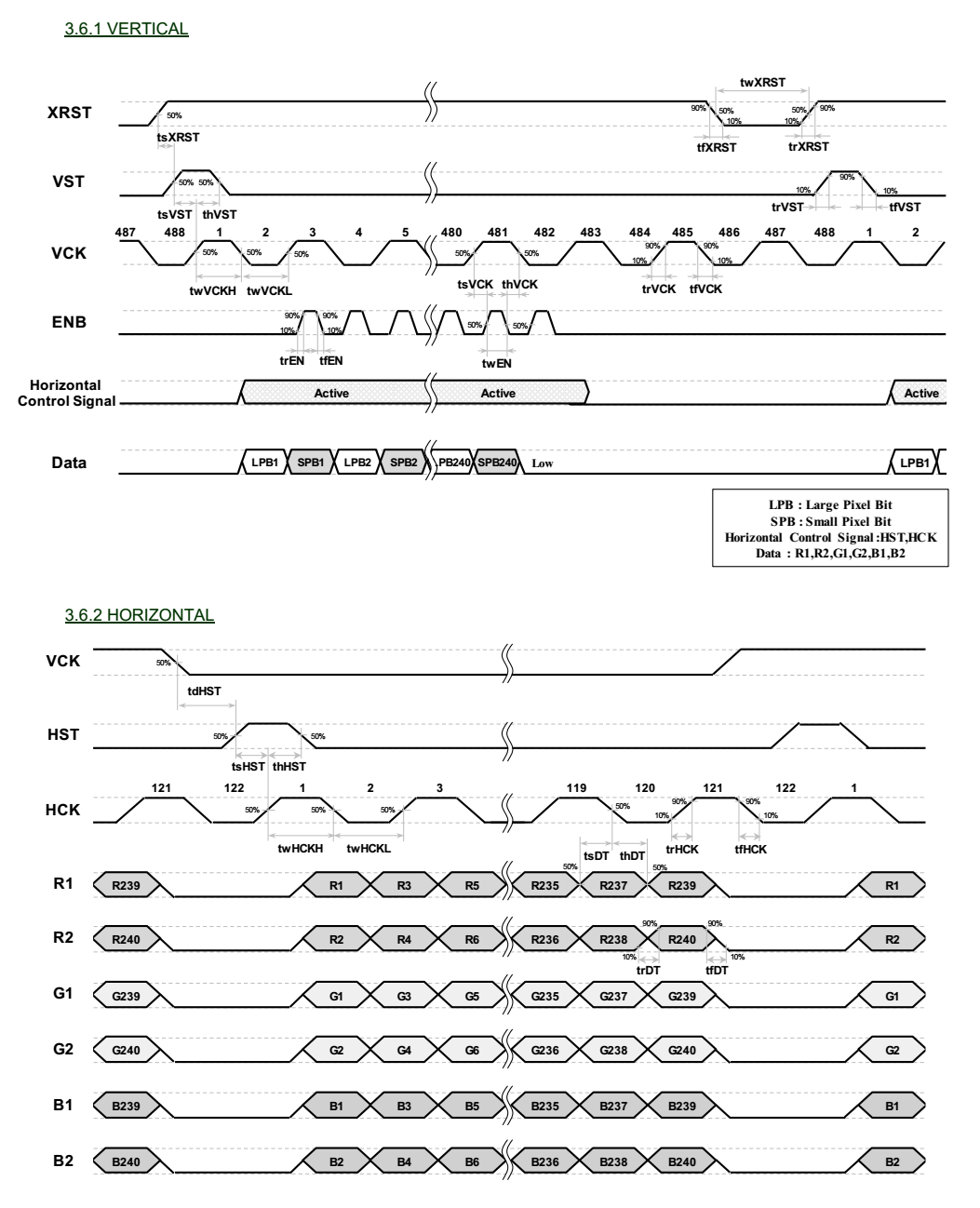
Take the timing diagram of the screen shown in the figure below as an example. This is a 240x240 screen, and the parameter configuration required for this timing diagram is as follows:
static LCDC_InitTypeDef lcdc_int_cfg =
{
    .lcd_itf = LCDC_INTF_JDI_PARALLEL,
    .freq = 746268, //HCK frequency

    /*
        Useless parameter for JDI PARALLEL interface,
        used to pass the format checking here.
    */
    .color_mode = LCDC_PIXEL_FORMAT_RGB565,

    .cfg = {
        .jdi = {
            .bank_col_head = 0, //Vertical Blanking pixles at the head
            .valid_columns = 240, //Vertical valid pixles
            .bank_col_tail = 4, //Vertical Blanking pixles at the tail

            .bank_row_head = 0, //Horizontal Blanking rows at the head
            .valid_rows = 240, //Horizontal valid rows
            .bank_row_tail = 4, //Horizontal Blanking rows at the tail

            /*
                ENB will be active during column [64~190]
            */
            .enb_start_col = 32,
            .enb_end_col = 95,
        },
    },

};
bank_col_head,valid_columns,bank_col_tail,bank_row_head,valid_rows,bank_row_tailare all specified in pixels. Note that on the timing diagram, every 2 VCK edges in the vertical direction make up one pixel, while every 1 HCK edge in the horizontal direction corresponds to two pixels.enb_start_colandenb_end_colare the start and end columns of the ENB signal divided by 2. This configuration is not strictly specified in most datasheets, but their range is [0, (bank_col_head+valid_columns+bank_col_tail)/2]
Refresh clock
Inside the LCD_DisplayOn and LCD_DisplayOff functions, an externally defined rt_device name (JDI_FRP_LPPWM_INTERFACE_NAME) is used to start and stop the PWM device output. The purpose is to switch the FRP/XFRP/VCOM output on and off.
The PWM clock frequency is set through the rt_pwm_set interface. The following code shows a 60 Hz, 50% duty cycle output setting:
/**
  * @brief  Enables the Display.
  * @param  None
  * @retval None
  */
static void LCD_DisplayOn(LCDC_HandleTypeDef *hlcdc)
{
    /* Display On, enable the FRP&XFRP output */
#ifdef JDI_FRP_LPPWM_INTERFACE_NAME
    struct rt_device_pwm *device = (struct rt_device_pwm *)rt_device_find(JDI_FRP_LPPWM_INTERFACE_NAME);
    if (!device)
    {
        LOG_E("Can not find FRP LPPWM device:%s", JDI_FRP_LPPWM_INTERFACE_NAME);
    }
    else
    {
        if (0 == (device->parent.open_flag & RT_DEVICE_OFLAG_OPEN))
        {
            rt_device_open((struct rt_device *)device, RT_DEVICE_OFLAG_RDWR);
            rt_pwm_set(device, 1, 16 * 1000 * 1000, 8 * 1000 * 1000); // Set period to 16ms, pulse to 8ms
            rt_pwm_enable(device, 1); //Enable PWM output
        }
    }
#endif
}

/**
  * @brief  Disables the Display.
  * @param  None
  * @retval None
  */
static void LCD_DisplayOff(LCDC_HandleTypeDef *hlcdc)
{
    /* Display Off, disable the FRP&XFRP output */
#ifdef JDI_FRP_LPPWM_INTERFACE_NAME
    struct rt_device_pwm *device = (struct rt_device_pwm *)rt_device_find(JDI_FRP_LPPWM_INTERFACE_NAME);
    if (!device)
    {
        LOG_E("Can not find FRP LPPWM device:%s", JDI_FRP_LPPWM_INTERFACE_NAME);
    }
    else
    {
        if (device->parent.open_flag & RT_DEVICE_OFLAG_OPEN)
        {
            rt_pwm_disable(device, 1); //Disable PWM output
            rt_device_close((struct rt_device *)device);
        }
    }
#endif
}
Serial (JDI_SERIAL)
We have not tested serial JDI so far, although it is supported by hardware.